English French German Spain Italian Dutch Russian Portuguese Japanese Korean Arabic Chinese Simplified

15.6.14

Best Android Keyboard becomes free on the Play Store!


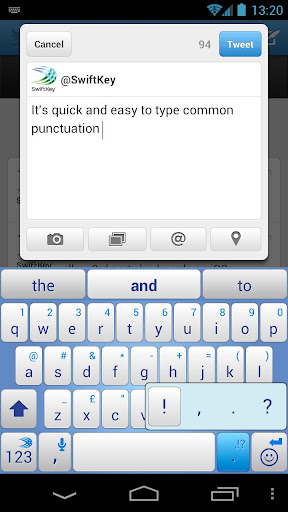
Swiftkey is an app for Android (2.2 and above) that replaces your onscreen keyboard , with an intelligent easy to use and faster keyboard that is guaranteed to increase your typing efficiency.


This app delivers smart auto-correct and word prediction in over 60 languages!


Recently , this app has received many upgrades , and now comes with its own store , which includes over 30 themes and is now available for free on Google Play. 


Health Tip - F.lux


Ever stay up late at night to finish some work , and get blinded by the screen?

During the day, computer screens look good—they're designed to look like the sun. But, at 9PM, 10PM, or 3AM, you probably shouldn't be looking at the sun.

f.lux fixes this: it makes the color of your computer's display adapt to the time of day, warm at night and like sunlight during the day.

It's even possible that you're staying up too late because of your computer. You could use f.lux because it makes you sleep better, or you could just use it just because it makes your computer look better.

f.lux makes your computer screen look like the room you're in, all the time. When the sun sets, it makes your computer look like your indoor lights. In the morning, it makes things look like sunlight again.


1.10.13

15K Twitter Accounts Hacked , A True Story ?


Few days back an article was published on techworm.in, where a hacker named "Mauritania Attacker" leaked claimed to leak thousands of twitter accounts, the data was made available for public to use and was uploaded on zippyshare.com. The data contained the twitterid, twitternick, oauthtoken nand oauth_token_secret.


How Was the data breached?

Well, it seems to me that the database of a third party app was breached which contained the list of Oauth tokens. In laymen terms oauth is used for authorizing the third party applications without the need of giving them the password. 

The application is granted an access token which it uses to authorize it selves, which means that an attacker having hold of the access token would be able to access the twitter accounts without the need of a password. The Oauth tokens can be easily be by tampering the request with a web application proxy such as Tamper Data, Burp suite etc. Twitter has recently introduced Two step authentication, however it isn't much handy in this case.

How Twitter Users Can Protect Themselves?  

Well, if the attacker keeps compromising database of the third party applications and getting the hold of the oauth tokens, then their is not much that twitter can do, Since they can protect their database from being breached, however they certainly have no hold of the third party application database.

Twitter users are advised to revoke access to all the third party application and reauthorize them, therefore the access tokens would be expired and the attacker would not be able to use them. Twitter users should only use trusted third party applications and when they are not using any of them, they should revoke the access so that the access token would be expired.

Facebook, has also known issues with their oauth in past, Security reseachers have pointed multiple flaws and all of them relied upon stealing of the oauth tokens, The issue with twitter in this case is a bit different, the access tokens were compromised due to a third party app, whereas in facebook oauth tokens could have been compromised due to a flaw inside it's design.

Twitter has denied the claims made by an attacker that any part of the twitter's database was compromised, which seems true to me. The Mauritania Attacker has posted a status on his facebook that he will reveal exactly how the access tokens were compromised today to techworm.

19.7.13

How To Do Direct Download Of Torrent Files For Free Without Using Any App

Friends, this is an post which lacks of people search everyday, but they get disappointed by seeing the results in which they are asked to download apps and then they can do direct downloads. But how is it called a direct download if they need to install some apps like 1clickdownloader, uTorrent, Bittorrent and other such apps. Now here, there won't be the need to install, download Or use any apps to download or anything. Don't think that it'll go in the same speed as any torrent downloader. It gives out the same speed as if you're downloading a file from mediafire or any other such file hosting websites.

Now,
I stop my lecture and start saying what you need to do step by step  :-)

Steps For Downloading Torrent Files Without Any App:

Step 1:-
Copy the magnet link of the torrent file you want to download.

Step 2:-
Go to btcloud.io , A Torrent file host from where you can get the link for doing direct download of any thing.


Sign up (Log in button serves the same function as Signing in) using any of the given options such as Facebook, Google and other. If it asks some permissions, accept it (Ex : If you sign up using Google, it'll ask to know what you are in google and other stuff).

Step 3:-
Then you can paste the link in the box given for pasting the magnet link.

After pasting the link, just press Add button at the right side of the box.

Step 4:-
After pressing Add button the file should have been shown in below. You might see some senseless name of the file and file size, but have patience and wait for a minute. Because the file will be downloaded to your cloud storage and the direct link will be given to you!

Step 5:-
After the download of the file has got completed, press on the name of the torrent file you have given for download.

Step 6:-
Click the ZIP button as highlighted below and download the file


Excellent right? You have successfully downloaded a torrent file without using any app! Enjoy and please don't forget to  SHARE

15.7.13

100 Ways To Become A Better Hacker


Well, The title is self explanatory. This post would not rely upon my input but it would rely upon your input, We will be gathering here 100 ways to become a better hacker. In other words 100 ways to improve your skills as a hacker.

Rules

1) Every person would get the credit for his submission.

2) The submissions needs to be precise and should be unique from what others have submitted so far.

3) Only the top 100 submissions would be entertained.

4) Once we are finished with accepting and publishing 100 submission, you can still submit your answers, What we would do then is overwrite the existing ones with the better ones.

5) Only submission via comments would be accepted.

100 ways to become a better hacker

1) Learning scripting languages such as PythonPerl and ruby can help you automate your tasks and for sure improve your skills. ~ Rafay Baloch

2) Understanding all possible user inputs is the fastest way to hack into the systems. ~ Shahin Ramezany 

3) When u gain access to an account or whatever u hacking in to, best practice do not alter anything. just monitor the activity and continue fetching information u need. ~ josh odongo

4) Travel and see different countries, it will make you better ~ Egor Homakov

5) Never hesitate for usage of Google and other resources available i.e. exploit-db, and be updated with versions and bugs in each versions, for example, if I talk about WordPress, then one who is looking to hack WordPress website or pentest, then he should be well aware of at least 3.0+ versions updating, so whichever version is being used on the website, he should know the vulnerabilities in that and their exploitation ~ Anonymous

6) RTFM, don't expect handouts. Educated questions, gets you educated answers ~ TomG

7) Move to Linux, learn Programming Languages CPearlLispJava and Html and write open source programs. Improve your functional English. ~ Asfar

8) The most important factor for becoming a good hacker is, you must have your personal interest with computers. Additionally, you have to be definite in your work, such that you should take exactly interest in One thing at a single time. After covering the appropriate level of theory, the learner should try it practically as much as his satisfaction level. Watching Tutorials only for taking points, not really for following them from a to z exactly, because you have to be a good learner only if you have your personal intention for doing the things creatively. ~ Nasruminallah Zeeshan

9) One thing , Learn how old Hackers Started don't focus on new Programs like BACKTRACK , METASPLOIT , Learn Manual Hacking , Learn Coding and be patient ! Knowledge will come with time ! and practice all methods ~ Amie

10) Do not rely on tricks for hacking. As they will keep you a script kiddie, get deep understanding about stuffs. And also don't rush from one topic to another. All those combined will make you a better hacker. "Slow and Steady wins the race"  ~ Bluff Master 

11) A support will always lift you up. Join groups, forums. Keep yourself updated with latest hacking news by reading blogs [Like this ;)], tweets etc. ~ Sahil Sehgal

12) Understand what programming language to use at what moment. You're time is valuable so don't waste it writing something that could have been done faster! (and understand the difference between a scripting language and a programming language, python for example is a programming language. ~ Saikia81

13) During hacking remain mentally intact and focus on your each step. During a step always remember your next steps and the way you have to link them. Dont always use old methods and tricks, try new one and use your own mind too. and remember one thing that there is no shortcut of Hacking, to became a hacker, you have to give your whole passion to hacking. "Hacking is an Art, and Hacker is an Artist".  ~ Ali

14) This Attitude should be there within "SWEAT MORE IN PRACTISE, SO YOU BLEED LESS IN WAR" #defensive #offensive #B31212Y 

15) Whatever you're going to test,start it with a basic stuff. If you dont know any,start learning.
~ Ahmed Ashraff 

16) Enumeration is the key to pwnage, the more you enumerate the more attack surface you get ~ Prakhar Prasad

17) Be patient! Learn different protocols and read the RFCs to understand how they work and if there are some "security by design" issues. After that you should try to understand the context you're in and therefore develop an exploit for this particular context. ~ David Viera Kurz

18) Sleep less, read more. Learn & Think & Try & Fail & Never give up. Remember, "...imagination will take you everywhere". ~ Gökmen GÜREŞÇİ

19) Don't compete anyone, never think you are the best, just compete "the you in the past". There will always be a vulnerability waiting for being discovered, by someone who thinks different. Understanding human logic makes things easier. "Hackers realize, kiddies memorize" ;) ~ Agd_Scorp

20) Learn your own systems inside out, before moving on to other systems. The better you know your own, the more capable you will find yourself when it comes time to make your system work for you. ~ jericho

21) To be a good hacker, you need have good social engineering skills. Try to understand your victim's mentality, it will give you the ability to guess his/her confidential information ~ Shakil Hussain

22) A great person had said "if i had 8 hours to chop down a tree, I'd spend 6 hours sharpening my axe". Apply this on yourself. Prepare yourself! Learn programming, networking, scripting and all, be passionate, motivate yourself then start hacking with your own ideas...You will surely win! #initinpandey 

23) Use your inner power to became a great hacker. Just keep reading.. The more you read..the more you understand things behind the scene. ~ nikhilkulkarni 

24) A startup now can be just a pair of 22 year old guys. A company like that can move much more easily than one with 10 people, half of whom have kids. ~ Anonymous

25) Think of all the psychic energy expended in seeking a fundamental distinction between "algorithm" and "program" ~ Amit Prakash 

26) If you don't have time to do it right, when will you have time to do it over? ~Sunny Rockzzzz 

27) Out in the field, any connection with home just makes you weaker. It reminds you that you were once civilized, soft; and that can get you killed faster than a bullet through the head.”~ Henry Mosquera

28) Most hackers are young because young people tend to be adaptable. As long as you remain adaptable, you can always be a good hacker.” ~ Emmanuel Goldstein 

29) Be very careful. We suggest getting a book on HTML to avoid becoming a real legend in the hacker world. Putting up a web page before you know how to put up a web page is generally a very bad idea. The .gov sites are an exception. ~ th3.d3sty0y3r

30) We were addicted to hacking, more for the intellectual challenge, the curiosity, the seduction of adventure; not for stealing, or causing damage or writing computer viruses. ~ Defencely.com

31) To be a good hacker you have to learn from yourself. Learn from books like "The basics of ethical hacking and pen testing" and "The web app hackers handbook-Ed.2". Once you learnt these books i promise you will be able to hack systems as well as web apps. ~ Aarshit Mittal

32) Try to see, feel and possibly touch everything that you learn, only then you will be confident about your attacks/defenses. ~ Nishant Das Patnaik

33) Adopt the mindset of a hacker ~ Mohamed Shimran

34) You may not be there yet but with everyday practice you will be closer than yesterday. ~ Anonymous

35) Set of code has to be made by a hacker Don't get caught Learn the basic functionality of a system and network then explore their loop holes Every developer make mistake while developing identify the exploit and notify them to the develop ~ Vinoth Vel o

36) Learn Russian. Every infosecurity geek should know Russian. ~ i Sciurus

37) When you learn something in this field, always put it to good use .Defacing websites will not make you a better hacker, but, helping someone with their security might earn you a respect even higher than what a blackhat may get . ~ Himanshu Sharma

5.6.13

How To Download Games From Miniclip.com

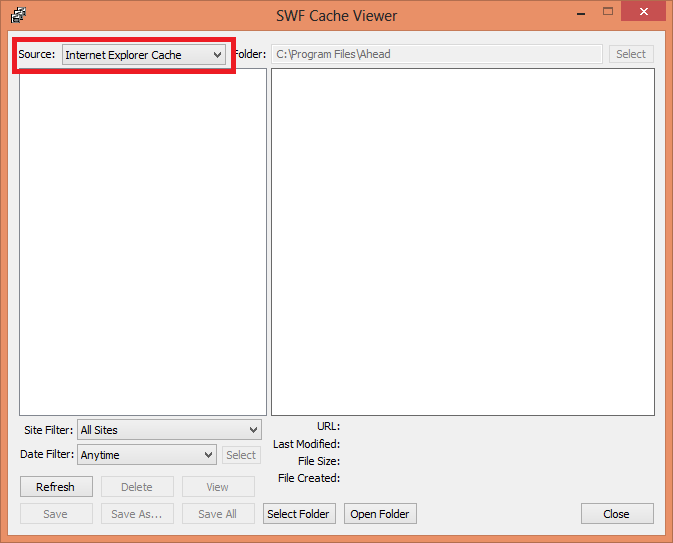
The most popular Flash Games Website Miniclip.com games can be downloaded. Using one simple app called SWF opener. It is a app that can help you view the browser cache (where all the loaded miniclip games get saved). It doesn't just saves it even play or open it at the same time.


So here is the download link for the SWF opener:-
http://www.mediafire.com/download/rgz368bk2a8b7xw/SWFOpenerSetup.exe

And here are the simple steps you will have to follow to get the SWF (miniclip game) for your own:-

1. After downloading install it.

2. Then open the app and go to View option from above, then View SWF Cache


3. As I know this doesn't support Chrome. Now choose which browser you are using to open Miniclip games.


4. After the game in miniclip.com completely you can use refresh button in Swf opener to refresh and to see the items in cache.

5. Now one of the SWF file in the list shown in SWF opener will be the game, click on it, there will be a short preview shown at right side, so there wont be much problem identifying the game.

6. Click Save as and save it with the name you wish, do not change any other option, the saved files will probably go to C:\ (In Win 7, And Win 8).

7. Enjoy playing the game offline!

17.4.13

Remove Other Users of any Wi-Fi using an Android mobile!


Wifi Kill:
            
Well, with this app you can disable internet connection for a device on the same network.

 So if someone (anyone) is abusing the internet wasting precious bandwidth for a Justin Bieber videoclips you could just kill their connection and stay happy with a full bandwidth just for yourself.

 Well, with this app you can disable internet connection for a device on the same network.

 After a long long delay, I present to you brand new WiFiKill.


WifiKill 2.2 Apk App 

WifiKill 2.2 Apk App 

 *ROOTED PHONE REQUIRED*

Requirements : Android 4.0 or above


Hack Whatsapp using Android Mobile


WhatsApp Sniffer :  
  WhatsAppSniffer is a tool for root terminals to read WhatsApp conversations of a WIFI network (Open, WEP, WPA/WPA2). It captures the conversations, pictures / videos and coordinates that are sent or received by an Android phone, iPhone or Nokia on the same WIFI network. It has not been tested with Windows Phone terminals. It can't read the messages written or received by the BlackBerry's, as they use their own servers and not WhatsApp's.

 This application is designed to demonstrate that the security of WhatsApp's communications is null. WhatsAppSniffer just use the TCPDump program which reads all the WIFI network packets and filters those which has origin or destination WhatsApp's servers. All messages are in plain text, so it does not decrypt anything, complying fully with the legal terms of WhatsApp (3.C: "While we do not disallow the use of sniffers Such as Ethereal, tcpdump or HttpWatch in general, Any we do going efforts to disallow reverse-engineer our system, our protocols, or explore outside the boundaries of the ordinary requests made by clients WhatsApp .... ")
 For WPA/WPA2 encrypted networks, it uses the tool ARPSpoof (optional).


Features:
 - For now, there is only support for this characters:
 - Read conversations outgoing and incoming to Android, iPhone and Nokia phones.
 - They are separated by phone number
 - Notify when a message has been captured
 - Ability to start a debug session saving all logs

 - It matches phone numbers captured with agenda for coincidences 

 (ROOT REQUIRED)

Legal Terms:
WhatsAppSniffer comes with absolutely no warranty. You use this software on your own risk. The developer is not responsible for any damages caused by WhatsAppSniffer or it´s usage. It´s only the users responsibility to check his country's laws in order to make sure that the usage of WhatsAppSniffer is permitted by law in his country. In some countries stealing someones conversations might be prohibited by law. Always think about what you´re doing! Stealing someones conversations can cause real trouble for him and maybe for you.

Download Thousands of Applications for your Android for free - Android BlackMarket


Android Blackmarket : 
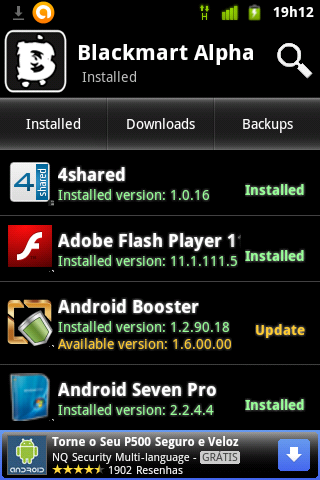
Blackmart is a tools to get all android application for free. You can use this apps to get various apps without paying for them. Maybe you have using similar application such as appbrain, bestmartket, and other, but blackmart is different.
Also used to update your device apps search for paid apps or upload apps from your device to host so others can download them.
 Also this app is updated quickly you'll be notified if there is an update.
Stop thinking where you will find money to pay any paid app.This app is the answer of your problem.Now get  any app you want for FREE.Try it now!

Requirements :
 Android 2.2+

Download Instructions:
- Download file
- Put the .apk file in your sd card
- Install .apk file in your phone by clicking  on it
- Finished! Enjoy thousands of free apps for your Android


16.4.13

FaceNiff - Facebook Session Hijacker for Android


FaceNiff is an Android app that allows you to sniff and intercept web session profiles over the WiFi that your mobile is connected to.
 
It is possible to hijack sessions only when WiFi is not using EAP, but it should work over any private networks (Open/WEP/WPA-PSK/WPA2-PSK)
 
It's kind of like Firesheep for android. Maybe a bit easier to use (and it works on WPA2!).
Please note that if web user uses SSL this application won't work.

*Legal notice: this application is for educational purposes only. Do not try to use it if it's not legal in your country.*

*Rooted Phone is required* 

Supported services (new coming soon):
  • FaceBook
  • Twitter
  • Youtube
  • Amazon
  • VKontakte
  • Tumblr
  • MySpace
  • Tuenti
  • MeinVZ/StudiVZ
  • Blogger
 

Free Keylogger 3.6


What is Keylogging?

Keylogging  is recording what exactly has been typed on your keyboard.
Keylogging can be used for security measures or for finding out your friends passwords if the login to anything using your pc.

How it works?
 
Keylogging can be done in 2 ways- 1.Hardware keylogging   ,  2.software keyloggers
Keyloggers usually just store the data that is typed by your keyboard

  Free Keylogger 3.6 can record every keystroke typed on keyboard in covert, invisible mode. In addition to standard function, this key logger is able to scan clipboard for changes and monitor Internet navigation (visited websites). With this program you will know what other users are doing on a computer while you are away. Download and begin spying right now, because it is completely free!


17.3.13

The Matrix Live Wallpaper for PC

 The Matrix

This is the distribution page for ZMatrix.  ZMatrix is an animated desktop background which displays streaming characters in a style similar to what was used in the movie 'The Matrix'.  The program was based off of source code for a screen saver found at www.elouai.com, and is entirely free.


Requirements:

-Windows 98, Me, 2000 or Higher
-2.0 Megs of Disk Space


The Matrix Live Wallpaper is also available for Android =>   Click here 


16.3.13

Swiftkey Keyboard apk


           SwiftKey – the best-selling keyboard on Android


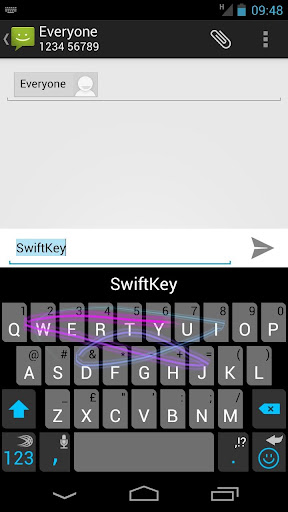
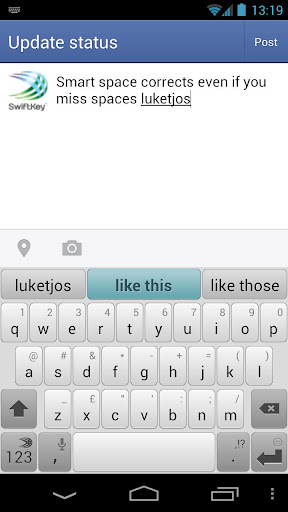
 SwiftKey replaces the touchscreen keyboard on your phone with one that understands how words work together, giving the world’s most accurate autocorrect - and predicting your next word before you press a key.
The keyboard learns as you use it to make corrections and predictions based on the way that you write. It can learn from your Gmail, Facebook, Twitter or blog to make its insights even more personalized. You can also enable up to three languages simultaneously, for true multi-lingual typing.

Switch seamlessly between tapping and gesture typing with our new SwiftKey Flow feature. It combines the mind-reading capabilities of SwiftKey with the speed of gliding your fingers across the screen. With ‘Flow Through Space’, you can also enter entire phrases without lifting your finger from the screen, simply by sliding to the space bar between words.

Language support (enable up to three at once):
English (US)
English (UK)
English (AU)
Afrikaans
Albanian
Arabic
Armenian
Azerbaijani
Basque
Bosnian
Bulgarian
Catalan
Croatian
Czech
Danish
Dutch
Estonian
Finnish
French (CA)
French (FR)
Galician
Georgian
German
Greek
Hebrew
Hindi
Hinglish
Hungarian
Icelandic
Indonesian
Irish
Italian
Javanese
Kazakh
Korean
Latvian
Lithuanian
Macedonian
Malay
Norwegian
Persian (Farsi)
Polish
Portuguese (BR)
Portuguese (PT)
Romanian
Russian
Serbian
Slovak
Slovenian
Spanish (ES)
Spanish (US)
Spanish (LA)
Sundanese
Swedish
Tagalog
Thai
Turkish
Ukrainian
Urdu
Vietnamese


(6.5 MB)


13.12.12

How To Protect Image Theft from Website


You can’t prevent everyone from using your posts. If you don’t want the users to download or steal your images, the best and most effective way is not upload them online! You can’t completely eliminate others from using your images. However, you can work on a few techniques to make it really hard for others who try to steal your images.

1. Add Watermark

Watermark is possibly the most effective and simple way of ensuring image protection. Watermark is a visual copyright placed on an image. The bigger the watermark is, the harder it becomes to steal the image or download them without authorization. However, it is a visual distraction for users who try to view the image.

2. Post Low Resolution Image

Posting a low resolution image is another way of protecting the images. Uploading an image with 550 pixels saved with 72 dpi is a perfect size to upload and makes it look decent while viewing online. At the same time, the image leaves more or less no room to work on for people who download.

3. Disable Right-Click on Webpages

Most people copy images by just right clicking and downloading the images. If you post images on your website, you can prevent “right clicking” by placing the images as background to tables. You can do it easily by following a simple code in CSS. Alternate way to prevent right clicks by using a JavaScript. These scripts override the right clicks when someone tries to copy the image.

4. Indexing Technique

People can misuse your images only when it comes under the search engine indexing. You can protect your images from being indexed by the search engine spiders. Using a non-index (noindex) and un-follow (nofollow) tags eliminates the entire webpage from getting indexed. However, if you want only the content to be indexed and not the image all you need is a Meta tag. The Meta information prevents the spiders from indexing just the image.

These are some of the techniques you can follow to protect your images from online thefts! If you really wish to share your images on a public forum, you have to take all the possible steps to protect them. Though these take time, you will not get a nasty surprise when you see your image on a different website!

How To Speed-up Windows


1. Speeding up your Windows PC startup time :

You can optimize your computer’s startup speed by launching Run on your Windows computer and typing “msconfig” without the quotes. This will take you to the System Configuration Settings which has five tabs – General, Boot, Services, Startup, and Tools.

Under the General tab, you’ll find 3 startup selections: normal, diagnostic, and selective. During normal startup, all device drivers and services will be loaded by your computer. If this is ticked, it may be the reason why your computer is taking long. Choose either diagnostic or selective startup to speed up the starting time of your Windows computer. Diagnostic startup only loads basic devices and services whereas with selective startup, you can choose to load neither system services nor startup items. After making a selection select “Apply.”

Under the Boot tab, select Advanced options so you can choose the number of processors to facilitate boot speed. If you have a dual-core or quad-core processor, assigning more than one of them to help with the start-up process can significantly boost your computer’s speed. Unfortunately, this optimization tweak is not so efficient on power so if you’re using a laptop, expect some battery drain after startup.

Finally, there’s the Services and Startup tab where you can specifically choose which services and startup items are going to load.

2. Speeding up your Windows Start Menu :

The Start Menu is another serious offender as it often takes time to load. Once again you need to open Run but this time, you will type “regedit.exe” to launch the Registry Editor. Go to the HKEY_CURRENT_USER folder and find Control Panel –> Desktop –> MenuShowDelay. Then, double click MenuShowDelay to edit its value. Type in the numbers on the blank and hit “OK.” Remember, the lower the value the faster the Start Menu will load.

Another trick for speeding up your Windows Start Menu would be to limit the number of shortcuts on your desktop. It could be that you just have too many icons on your desktop and that’s what is causing your computer to take long when loading the Start Menu.

3. Speeding up the Right Click Menu :

Yet another disappointing slow-down that Windows users experience is the time it takes the Menu to show up when hitting the right click. Installing third-party programs that allow you to remove items from the context menu should speed it up.

25.10.12

Speed up your downloads with IDM


Speed up your downloads with IDM :

 Internet Download Manager is a tool for increasing download speeds by up to 5 times, and for resuming, scheduling, and organizing downloads.

 The program will resume unfinished downloads due to network problems, or unexpected power outages. 

The program features a full-fledged site grabber that downloads files that are specified with filters, for example, all pictures from a Web site, different parts of Web sites, or complete Web sites for offline browsing. 

The program supports HTTP, HTTPS, FTP and MMS protocols, and has an adaptive download accelerator for MP3 audio, FLV and MPEG video files. 

The program also features Download Video and Audio Panels for Internet Exporer, Chrome, Opera, Safari, Firefox and other Mozilla based browsers that appears on top of a web-player and can be used to download flash videos from sites like YouTube, MySpaceTV, Google Videos

Click here to download!!

on Thursday, October 25, 2012 by  |  

15.10.12

How to increase Virtual RAM


How to increase Virtual RAM


1) Hold down the 'Windows' Key and Press the 'Pause/Break' button at the top right of your keyboard.
Another way is Right-Clicking 'My Computer' and then Select 'Properties'.

2) Click on the 'Advanced' tab.

3) Under 'Performance', click 'Settings'.

4) Then click the 'Advanced' tab on the button that pops up.

5) Under 'Virtual Memory' at the bottom, click 'Change'.

6) Click the 'Custom Size' button.

7) For the initial size (depending on your HD space), type in anywhere from 3000-4500 , and for the Maximum size type in anywhere from 3000-4500 .

8) Click 'Set', and then exit out of all of the windows.

9) Finally, Restart your computer.

10) You now have a faster computer and 1-2GB of Virtual RAM..!

How to quickly change your IP address


 To quickly change your IP address :

 
1. Click on "Start" in the bottom left hand corner of screen
2. Click on "Run"
3. Type in "Command" and hit ok

1. Click on "Start" in the bottom left hand corner of screen
2. Click on "Run"
3. Type in "command" and hit ok

You should now be at an MSDOS prompt screen.

4. Type "ipconfig /release" just like that, and hit "enter"
5. Type "exit" and leave the prompt
6. Right-click on "Network Places" or "My Network Places" on your desktop.
7. Click on "properties"

You should now be on a screen with something titled "Local Area Connection", or something close to that, and, if you have a network hooked up, all of your other networks.

8. Right click on "Local Area Connection" and click "properties"
9. Double-click on the "Internet Protocol (TCP/IP)" from the list under the "General" tab
10. Click on "Use the following IP address" under the "General" tab
11. Create an IP address (It doesn't matter what it is. I just type 1 and 2 until i fill the area up).
12. Press "Tab" and it should automatically fill in the "Subnet Mask" section with default numbers.
13. Hit the "Ok" button here
14. Hit the "Ok" button again

You should now be back to the "Local Area Connection" screen.

15. Right-click back on "Local Area Connection" and go to properties again.
16. Go back to the "TCP/IP" settings
17. This time, select "Obtain an IP address automatically"
 18. Hit "Ok"
19. Hit "Ok" again
20. You now have a new IP address

10.10.12

Tor Browser : Used for Hardcore Hacking And for opening Hidden and blocked Websites on the Internet


You wont believe, but this is used to open hidden websites which were banned after analyzing that those websites had working hacks. It mainly includes websites with domain .onion just similar to .com, .in, .org and others

What is tor??
Tor is a network of virtual tunnels that allows people and groups to improve their privacy and security on the Internet. It also enables software developers to create new communication tools with built-in privacy features. Tor provides the foundation for a range of applications that allow organizations and individuals to share information over public networks without compromising their privacy.

Why Tor is needed??
Using Tor protects you against a common form of Internet surveillance known as "traffic analysis." Traffic analysis can be used to infer who is talking to whom over a public network. Knowing the source and destination of your Internet traffic allows others to track your behavior and interests. This can impact your checkbook if, for example, an e-commerce site uses price discrimination based on your country or institution of origin. It can even threaten your job and physical safety by revealing who and where you are. For example, if you're travelling abroad and you connect to your employer's computers to check or send mail, you can inadvertently reveal your national origin and professional affiliation to anyone observing the network, even if the connection is encrypted.

A basic problem for the privacy minded is that the recipient of your communications can see that you sent it by looking at headers. So can authorized intermediaries like Internet service providers, and sometimes unauthorized intermediaries as well. A very simple form of traffic analysis might involve sitting somewhere between sender and recipient on the network, looking at headers.

How Tor Works??


How Tor works
Tor helps to reduce the risks of both simple and sophisticated traffic analysis by distributing your transactions over several places on the Internet, so no single point can link you to your destination. The idea is similar to using a twisty, hard-to-follow route in order to throw off somebody who is tailing you — and then periodically erasing your footprints. Instead of taking a direct route from source to destination, data packets on the Tor network take a random pathway through several relays that cover your tracks so no observer at any single point can tell where the data came from or where it's going.
To create a private network pathway with Tor, the user's software or client incrementally builds a circuit of encrypted connections through relays on the network. The circuit is extended one hop at a time, and each relay along the way knows only which relay gave it data and which relay it is giving data to. No individual relay ever knows the complete path that a data packet has taken. The client negotiates a separate set of encryption keys for each hop along the circuit to ensure that each hop can't trace these connections as they pass through.
Tor circuit step two
Once a circuit has been established, many kinds of data can be exchanged and several different sorts of software applications can be deployed over the Tor network. Because each relay sees no more than one hop in the circuit, neither an eavesdropper nor a compromised relay can use traffic analysis to link the connection's source and destination. Tor only works for TCP streams and can be used by any application with SOCKS support.
For efficiency, the Tor software uses the same circuit for connections that happen within the same ten minutes or so. Later requests are given a new circuit, to keep people from linking your earlier actions to the new ones.
Tor circuit step three

Hidden Services In Tor
Tor also makes it possible for users to hide their locations while offering various kinds of services, such as web publishing or an instant messaging server. Using Tor "rendezvous points," other Tor users can connect to these hidden services, each without knowing the other's network identity. This hidden service functionality could allow Tor users to set up a website where people publish material without worrying about censorship. Nobody would be able to determine who was offering the site, and nobody who offered the site would know who was posting to it. Learn more about configuring hidden services and how the hidden service protocol works.

Browse or surf the internet as Anonymous
Tor can't solve all anonymity problems. It focuses only on protecting the transport of data. You need to use protocol-specific support software if you don't want the sites you visit to see your identifying information. For example, you can use Torbutton while browsing the web to withhold some information about your computer's configuration.
Also, to protect your anonymity, be smart. Don't provide your name or other revealing information in web forms. Be aware that, like all anonymizing networks that are fast enough for web browsing, Tor does not provide protection against end-to-end timing attacks: If your attacker can watch the traffic coming out of your computer, and also the traffic arriving at your chosen destination, he can use statistical analysis to discover that they are part of the same circuit.
The Future of Tor
Providing a usable anonymizing network on the Internet today is an ongoing challenge. We want software that meets users' needs. We also want to keep the network up and running in a way that handles as many users as possible. Security and usability don't have to be at odds: As Tor's usability increases, it will attract more users, which will increase the possible sources and destinations of each communication, thus increasing security for everyone. We're making progress, but we need your help. Please consider running a relay or volunteering as a developer.
Ongoing trends in law, policy, and technology threaten anonymity as never before, undermining our ability to speak and read freely online. These trends also undermine national security and critical infrastructure by making communication among individuals, organizations, corporations, and governments more vulnerable to analysis. Each new user and relay provides additional diversity, enhancing Tor's ability to put control over your security and privacy back into your hands.

Download Link:
https://www.torproject.org/download/download-easy.html.en